Friday, March 9, 2012

POSTAL HISTORY

World Postal History

1840
May 06: First Postage Stamp in the world Penny Black issued
1874
October 09: GPU (General Postal Union, the association before 
introduction of UPU) was established in Berne
1994
e-mail was introduced

POSTAL HISTORY

16th Cen
Mughal Emperor Akbar (Regime 1556-1605 AD) is credited with  organising an efficient system of despatch using horses and camels

1672
South Indian Ruler Raja Chikkadeva of Mysore organised a regular 
postal service throughout his dominion.
1688
First Post Office established in India by the British East India 
Company- Only official mail were transacted. 
1766
Robert Clive sets up Regular Postal System.
1774
The services of the Post Office were extended to private mails (on 
payment of postage) by Warren Hastings.
1774
Calcutta GPO was established. First PMG took charge in Calcutta. 
1786
Madras GPO was established
1794
Bombay GPO was established
1796
Zamindari Dak lines established
1820
J&K Postal Services came into existence
1830
Bombay Code Regulation XI suppresses "Private Dawks" 
1852
Scinde Dawks, the first indian paper stamp introduced by 
Sir Bartle Frere, Commissioner of Scind
1853
The Telegraph Department came into existence
1853
Overseas Mail Service started
1854
October 01: First Postage Stamp in India was issued
1860
Postal Manuals were published
1863
Railway mail Sorting was introduced
1867
Field Post Office (FPO) Organised
1873
First Embossed Envelope introduced
1876
India became a member in GPU (earlier form of UPU)
1877
Value Payable/Parcel/Insurance services were introduced
1879
Postcard was introduced
1880
Moneyorder service came into existence
1882
Savings Bank Deposit scheme was introduced
1884
Postal Life Insurance Scheme was started
1914
The departments of Posts and Telegraph merged as P&T Department 
1935
IPOs introduced
1947
November 21: First Stamp in Independent India issued ('National Flag')
1948
August 15: Issued stamps on Gandhiji
1953
P&T Department introduced Hindi as the Official Language
1957
November 14: first Children's Day Stamps issued (three stamps)   
1959
DLO name changed to RLO
1959
PRSS introduced
1961
July 01: Kerala Postal Circle formation. 
1972
August 15: Postal Index Number (PIN) introduced in   India  
1972
Sanchayika system introduced
1972
MPKBY system introduced
1975
QMS introduced
1994
Express MO, Postal Metro Channel, Rajadhani Channel introduced
2002
May 13: First embossed Postage Stamp issued 
("Parliament Golden Jubilee" 1952-2002)
2003
Bill Mail Service was introduced
2004
ePost was introduced
2005
Logistic Post, Direct Post were introduced
2006
instant Money Order (iMO) was introduced


Courtesy : katiharho.blogspot.in
Wednesday, March 7, 2012

COUNTER MDB FILE CORRUPTED-SOLUTION

 Error: While Logging point of sale if you  got a error "Counter access database seems to be corrupted, please logout from all terminals so the application can recover required information"


Solution:  Open Point of sale server folder..take a backup of COUNTER.MDB AND SafeCounter.mdb to a safe place.
Delete Counter.mdb from point of sale folder, Rename SafeCounter.mdb to COUNTER.MDB
           Paste Safecounter.mdb from that folder where we have took a backup.

IMO LOGIN ERROR


While trying to login in to the IMO Website using the user id and password if an error is coming as shown in

 the screenshot,here is the solution to solve the error

1.Click on Tools in the internet explorer and select internet options
2.Select the option security and click on custom level.then enable all activex controls


This will solve the error

Creating Maintenance Plans in SQL Server 2008 R2


One of the repetitive task that DBA need to perform is create maintenance plan for database. Maintenance plans enables you to automate maintenance activities for a database, backups, db integrity checks and index maintenance tasks. We can easily create a maintenance plan using a wizard in sql server 2008 R2.


You can use the following steps to create a maintenance plan
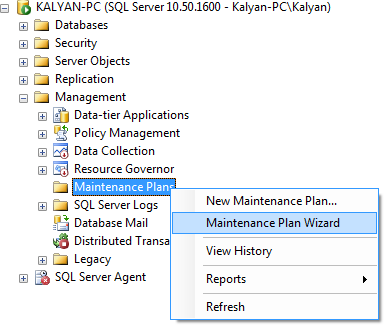
1. Select the Maintenance Plan Wizard from the context menu as shown below
image

2. You can specify a name and description for the plan and select the desired scheduling options
image
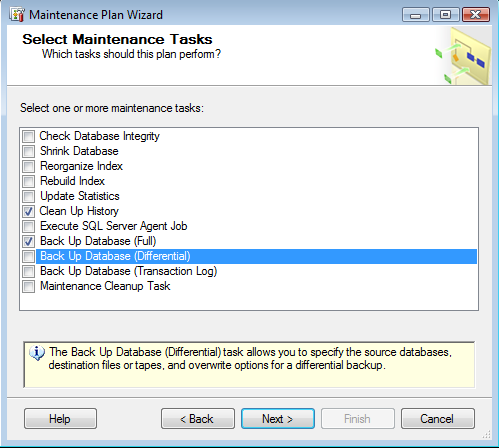
3. Select next to see the maintenance tasks that you want to perform 
image
4. Select the Maintenance tasks order 
image
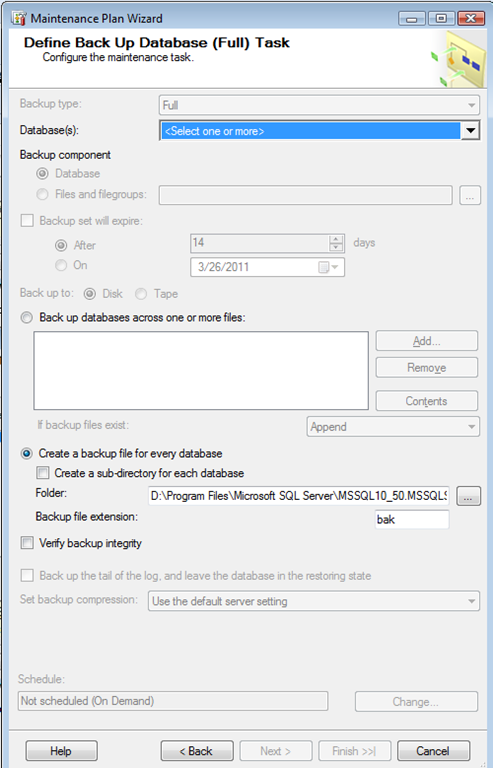
5. Select the database for the backup task. 
image
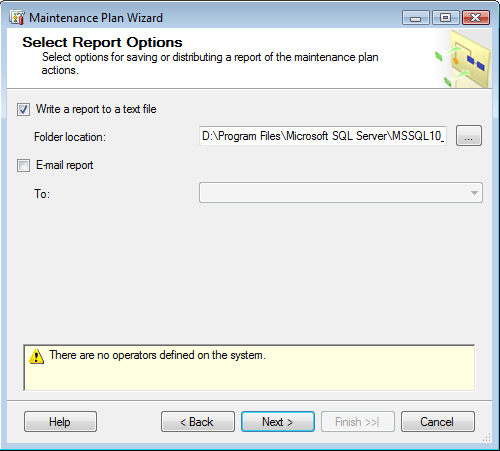
5. Select the reporting option for the plan like write log to a specific location or send an email or both.
image
6. Click finish to create your plan , while the plan is being created you will get the following status dialogue
image
7. You can see the created maintenance plan in object explorer
image
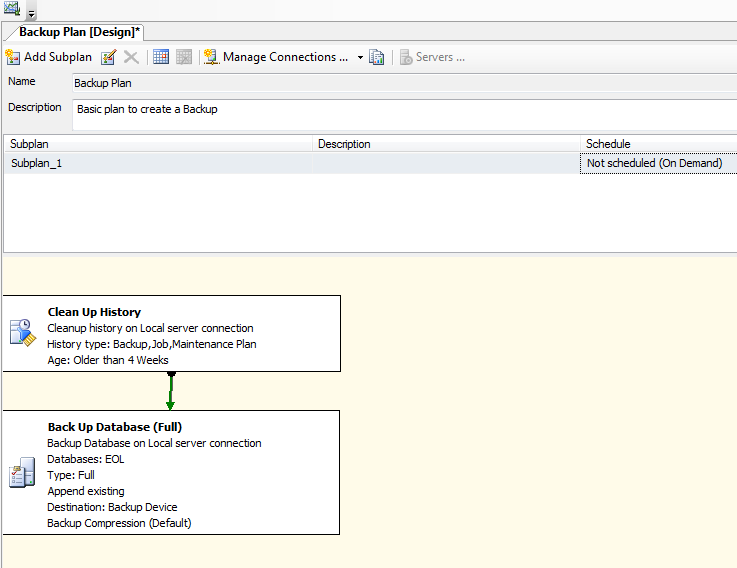
when you double click the Backup Plan from above window, you can get the designer
image

Courtesy : http://sysadmindop.blogspot.in/  & http://sapost.blogspot.com/

Tuesday, February 28, 2012

Repair corrupted and damaged files with File Repair


It may have happened at times that you find that you are unable to extract the contents of a compressed file , due to it being damaged or corrupted. At times like these freeware File Repair could be a real life saver.

File Repair is a freeware tool that lets you repair corrupt Word, Compressed Image, Video, Music. PDF files easily on your Windows computer.


It can repair the following types of files:
  • Word documents (.doc, .docx, .docm, .rtf)
  • Excel spreadsheets (.xls, .xla, .xlsx)
  • Access databases (.mdb, .mde, .accdb, .accde)
  • PowerPoint presentations (.ppt, .pps, .pptx)
  • Zip or RAR archives (.zip, .rar)
  • PDF files (.pdf)
  • Video files (.avi, .mp4, .mov, .flv, .wmv, .asf, .mpg)
  • Music files (.mp3, .wav)
  • Image files (.jpg, .jpeg, .gif, .tiff, .bmp, .png)
File Repair can repair the following types of errors:
  • Unable to read file
  • File cannot be accessed
  • File is not in a recognizable format
  • Application or software cannot open the type of file represented by file-name
  • Out of memory or Low system resources errors.
It will repair files which may have got damaged due to the following possible reasons: corrupted due to:
  • Malware infection
  • Sudden Power failure
  • Network interruption
  • Software errors
Head over to its home page to download this app:  Download 


Source : http://www.thewindowsclub.com/