Thursday, June 28, 2012


V2 SBCO Analyzer Ver 2.0

V2 SBCO Analyzer Ver 2 - Read me
Download full package
Download EXE
Suggestions and enquiry please contact
Rajeev Sharma (PA/SBCO)
Chamba HO
H.P- 176310
E:mail: rajeevsharma.agra@gmail.com
Saturday, June 16, 2012
V2-SBCO Analyzer
V2-SBCO Analyzer ( Download )
Saving Bank Utility:-
<!--[if
!supportLists]-->1.
<!--[endif]-->Full Ledger View
<!--[if
!supportLists]-->2.
<!--[endif]-->Closed Accounts having Balance
<!--[if
!supportLists]-->3.
<!--[endif]-->Un-Posted Accounts
<!--[if
!supportLists]-->4.
<!--[endif]-->Discrepancy in balance Sanchay Vs V2
<!--[if
!supportLists]-->5.
<!--[endif]-->Report Type of Accounts “SA/JA/SD”
etc
<!--[if
!supportLists]-->6.
<!--[endif]-->Total no of Accounts ..Office wise
<!--[if
!supportLists]-->7.
<!--[endif]-->Accounts not having index entry
<!--[if
!supportLists]-->8.
<!--[endif]-->Minus Balance, LOT etc
Recurring Deposits Utility:
<!--[if
!supportLists]-->1.
<!--[endif]-->Full Ledger
<!--[if
!supportLists]-->2.
<!--[endif]-->Closed Accounts with balance
<!--[if
!supportLists]-->3.
<!--[endif]-->Un-Posted Items
<!--[if
!supportLists]-->4.
<!--[endif]-->Total no of Accounts
<!--[if
!supportLists]-->5.
<!--[endif]-->Accounts not having index entry
<!--[if
!supportLists]-->6.
<!--[endif]-->RD Closed a/c having balance
<!--[if
!supportLists]-->7.
<!--[endif]-->Minus balance….LOT view..etc
MIS utility:
<!--[if
!supportLists]-->1.
<!--[endif]-->Excess interest paid (more than 72)
<!--[if
!supportLists]-->2.
<!--[endif]-->Total accounts
<!--[if
!supportLists]-->3.
<!--[endif]-->A/c not in index entry
<!--[if
!supportLists]-->4.
<!--[endif]-->ledger
<!--[if
!supportLists]-->5.
<!--[endif]-->lot ..etc
Settings
and extraction:-
<!--[if
!supportLists]-->1.
<!--[endif]-->Download and extract .ZIP/.RAR folder
and extract use winzip or winrar to extract it.
<!--[if
!supportLists]-->2.
<!--[endif]-->Find “Dummy” Folder and copy it to C:\
Drive.
3. Click on “Setup.exe”
file

Setup:-
Click ok to complete setup

4:- Click
Start > All Programs > V2 SBCO Analyzer and make shortcut to
desktop.
Imp: MS
office/excel needed to print reports
Suggestions and enquiry please contact
Rajeev Sharma
(PA/SBCO)
Chamba
HO
H.P-
176310
E:mail: rajeevsharma.agra@gmail.com
SBCO Control Registers Softwares ( SB63, RD85 , MIS85 & all Categories etc )
SBCO Control Registers Softwares ( SB63, RD85 , MIS85 & all Categories etc ) : Download
1. Download and Unzip
2. Copy all the file into a Folder ( Eg. COREG)
( Foxpro supporting files available in the COREG folder )
3. Create a Batch File and give name as "COREG.BAT"
Patch file creation procedure
C:\> Edit COREG.BAT
@ECHO OFF
CD\COREG
FOXPRO COREG
CD\
CLS
Save the file and create Shortcut into Desktop
4. Execute this COREG.BAT
( Password : RAJA)
5. Give HPO details
6. Add All SOs Names and Opening Balance to each SO for particular date
7. Then Enter Date wise Transaction
8. Prepare SBCO Registers
9. The LOT.exe is used to prepare LOTs for all categories
10. We can Convert the Data if the LOTs are prepared by this software ....
Download Foxpro
If any Doubt mail to iamraajaas@gmail.com
Daily Account Data Transfer Tool
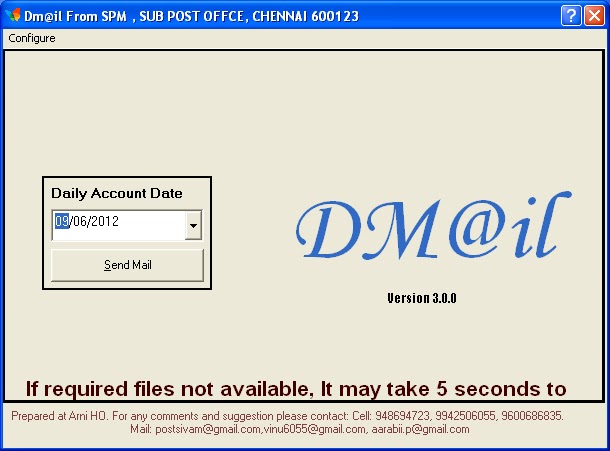
Salient Features:
1.No login Required
2.No need to Browse for daily account folder
3.No need to Zip the Daily account folder.
4.No need to delete the Zip folder after transmission
5.No need to delete the Daily Account Folder after transmission
6.One click enough to transfer Daily account files using Gmail accounts.
7.Standardized subject text for Easy download by using search option
8.easy to use.
9.May be scheduled to execute.
Download or Link2
Thanks to :
Shanmugam.P.
System
Manager,
Kannamangalam
S.O-632 311.
Cell:+919600686835
email:
aarabii.p@gmail.comFAMOUS INDIAN LEADERS BORN ON DATE
FAMOUS INDIAN LEADERS BORN ON DATE :
STUDY MATERIAL FOR
COMPETITIVE EXAMINATION
|
NAME
|
BORN
ON
|
|
Annie
Besant
|
October 1,
1847
|
|
Bal
Gangadhar Tilak
|
July 23,
1856
|
|
Dr.
B.R. Ambedkar
|
April 14,
1891
|
|
Chandrashekhar
Azad
|
July
23,1906
|
|
Gopal
Krishna Gokhale
|
May 9,
1866
|
|
Jawaharlal
Nehru
|
November 14,
1889
|
|
Lal
Bahadur Shastri
|
October 2,
1904
|
|
Motilal
Nehru
|
May 6, 1861
|
|
Dr.
Rajendra Prasad
|
December 3,
1884
|
|
Rajiv
Gandhi
|
August 20,
1944
|
|
Sardar
Patel
|
October 31,
1875
|
|
Sarojini
Naidu
|
February 13,
1879
|
|
Subhas
Chandra Bose
|
January 23,
1897
|
|
Sarvepalli
Radhakrishnan
|
September 5,
1888
|
|
Kasturba
Gandhi
|
April 11,
1869
|
|
Jayaprakash
Narayan
|
11 October
1902``
|
|
Jyoti
Basu
|
July 8,
1914
|
|
Dr
Zakir Hussain
|
February 8,
1897
|
|
K.R.
Narayanan
|
October 27,
1920
|
|
Fakhruddin
Ali Ahmed
|
May 13,
1905
|
|
C.N. Annadurai
|
September 15,
1909
|
|
K
Kamaraj
|
15 July
1903
|
|
V.P.
Singh
|
June 25,
1931
|
|
E
M S Namboodiripad
|
June 13,
1909
|
|
V.
K. Krishna Menon
|
May 3, 1896
|
|
N.
T. Rama Rao
|
May 28,
1923
|
|
Jayalalithaa
Jayaram
|
24 February
1948
|
|
J.B. Kripalani
|
November 11,
1888
|
|
Atal
Bihari Vajpayee
|
25 December,
1924
|
|
Charan
Singh
|
December 23,
1902
|
|
Chandra
Shekhar
|
July 1,
1927
|
|
Farooq
Abdullah
|
21st October,
1937
|
|
Indrajit
Gupta
|
March 18,
1919
|
| http://nfpemavelikaradivision.blogspot.in/ & http://sapost.blogspot.com/ | |
RUN Commands for XP,Vista, Windows 7
1.Microsoft
Access* msaccess
2.Microsoft Excel* excel
3.Microsoft Malicious Software Removal Tool mrt
4.Microsoft Paint mspaint
5.Microsoft Powerpoint* powerpnt
6.Microsoft Support Diagnostic Tool (Vista/Win7) msdt
7.Microsoft Word* winword
8.Mouse Properties control mouse
9.Mouse Properties main.cpl
10.MSN Messenger* msnmsgr
11.Regional Settings intl.cpl
12.Registry Editor regedit
13.Calculator-calc
14.Groupeditor-gpedit.msc
15.Dispaly Setting-desk.cpl
16.Event Viewer-eventvwr.msc
17.Game Contoller-joy.cpl
18.iP Configuration (Display Connection Configuration)-ipconfig /all
19.IP Configuration (Display DNS Cache Contents)-ipconfig /displaydns
20.IP Configuration (Delete DNS Cache Contents)-ipconfig /flushdns
21.IP Configuration (Release All Connections)-ipconfig /release
22.IP Configuration (Renew All Connections)-ipconfig /renew
23.IP Configuration (Refreshes DHCP & Re-Registers DNS)-ipconfig /registerdns
24.IP Configuration (Display DHCP Class ID)-ipconfig /showclassid
25.IP Configuration (Modifies DHCP Class ID)-ipconfig /setclassid
26.Shared Folders-fsmgmt.msc
27.Shuts Down Windows -shutdown
28.System File Checker Utility ( Scan Immediately )-sfc /scannow
29.System File Checker Utility ( Scan Once At Next Boot )-sfc /scanonce
30.System File Checker Utility ( Scan On Every Boot )-sfc /scanboot
31.System File Checker Utility ( Return to Default Settings)-sfc /revert
32.System File Checker Utility ( Purge File Cache )-sfc /purgecache
33.System File Checker Utility ( Set Cache Size to Size x )-sfc /cachesize=x
34.System Information-msinfo32
35.System Properties-sysdm.cpl
36.Task Manager-taskmgr
Courtesy : satirur.blogspot.in
2.Microsoft Excel* excel
3.Microsoft Malicious Software Removal Tool mrt
4.Microsoft Paint mspaint
5.Microsoft Powerpoint* powerpnt
6.Microsoft Support Diagnostic Tool (Vista/Win7) msdt
7.Microsoft Word* winword
8.Mouse Properties control mouse
9.Mouse Properties main.cpl
10.MSN Messenger* msnmsgr
11.Regional Settings intl.cpl
12.Registry Editor regedit
13.Calculator-calc
14.Groupeditor-gpedit.msc
15.Dispaly Setting-desk.cpl
16.Event Viewer-eventvwr.msc
17.Game Contoller-joy.cpl
18.iP Configuration (Display Connection Configuration)-ipconfig /all
19.IP Configuration (Display DNS Cache Contents)-ipconfig /displaydns
20.IP Configuration (Delete DNS Cache Contents)-ipconfig /flushdns
21.IP Configuration (Release All Connections)-ipconfig /release
22.IP Configuration (Renew All Connections)-ipconfig /renew
23.IP Configuration (Refreshes DHCP & Re-Registers DNS)-ipconfig /registerdns
24.IP Configuration (Display DHCP Class ID)-ipconfig /showclassid
25.IP Configuration (Modifies DHCP Class ID)-ipconfig /setclassid
26.Shared Folders-fsmgmt.msc
27.Shuts Down Windows -shutdown
28.System File Checker Utility ( Scan Immediately )-sfc /scannow
29.System File Checker Utility ( Scan Once At Next Boot )-sfc /scanonce
30.System File Checker Utility ( Scan On Every Boot )-sfc /scanboot
31.System File Checker Utility ( Return to Default Settings)-sfc /revert
32.System File Checker Utility ( Purge File Cache )-sfc /purgecache
33.System File Checker Utility ( Set Cache Size to Size x )-sfc /cachesize=x
34.System Information-msinfo32
35.System Properties-sysdm.cpl
36.Task Manager-taskmgr
Courtesy : satirur.blogspot.in
Subscribe to:
Posts (Atom)